GET /v1.1/files
List files available for offline processing. Returns signed URLs for downloading data exports as an alternative to querying the API directly.
Use /v1.1/search instead. It serves the same pricing data, refreshed in bulk in the background. What's different is that /v1.1/search returns JSON:API responses with query filters, ideal for user-facing search.
Use /v1.1/search/days instead. It serves the same itinerary days data with query filters, ideal for user-facing itinerary display.
Why use offline files?
The v1.1 API enforces rate limiting. If your application needs to warm up a local cache, rebuild a search index, or process all prices in a single day, paginating through /v1.1/search will be too slow and may exceed rate limits.
The /v1.1/files endpoint provides pre-built data exports that you can download in bulk, without any rate-limit concerns. Each file is accessible via a signed URL valid for 24 hours.
File organization
Files are organized under two top-level prefixes:
bulks/ — full data exports (NDJSON)
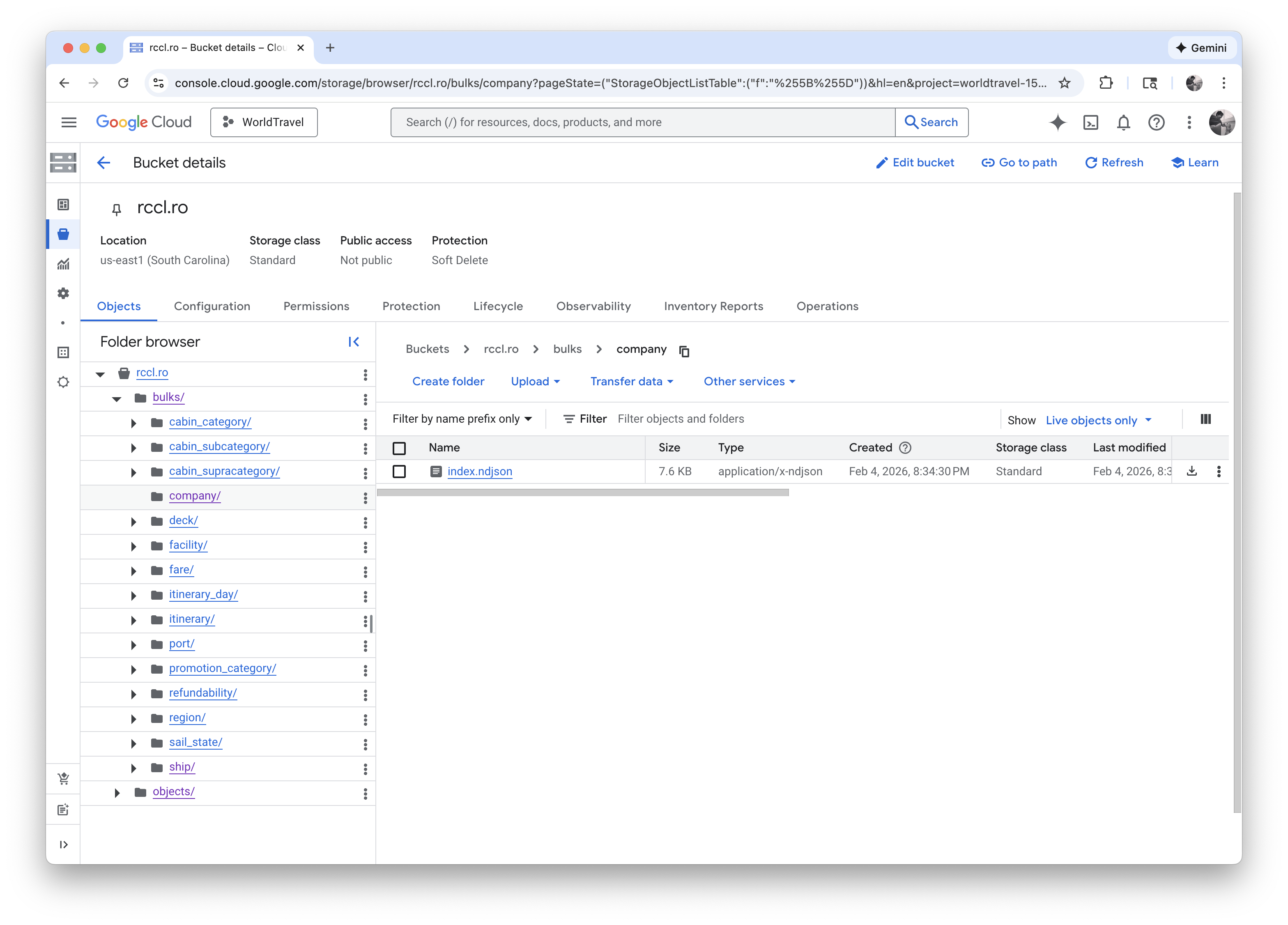
Each bulk export contains all records of a given type in a single Newline-Delimited JSON (NDJSON) file.
| Prefix | Structure | Description |
|---|---|---|
bulks/cabin_category | bulks/cabin_category/index.ndjson | All cabin categories in one file |
bulks/cabin_subcategory | bulks/cabin_subcategory/index.ndjson | All cabin subcategories in one file |
bulks/cabin_supracategory | bulks/cabin_supracategory/index.ndjson | All cabin supracategories in one file |
bulks/company | bulks/company/index.ndjson | All companies in one file |
bulks/deck | bulks/deck/index.ndjson | All decks in one file |
bulks/facility | bulks/facility/index.ndjson | All facilities in one file |
bulks/fare | bulks/fare/<region>/<ship>/index.ndjson | All fares, split by region and ship |
bulks/itinerary | bulks/itinerary/index.ndjson | All itineraries in one file |
bulks/itinerary_day | bulks/itinerary_day/<ship>/index.ndjson | All itinerary days, split by ship |
bulks/port | bulks/port/index.ndjson | All ports in one file |
bulks/promotion_category | bulks/promotion_category/index.ndjson | All promotion categories in one file |
bulks/refundability | bulks/refundability/index.ndjson | All refundability policies in one file |
bulks/region | bulks/region/index.ndjson | All regions in one file |
bulks/sail_state | bulks/sail_state/index.ndjson | All sailing states in one file |
bulks/ship | bulks/ship/index.ndjson | All ships in one file |
They contain the same data available through GET /v1.1/search, but organized for offline consumption. Fares are split by region and ship code to keep individual files at a manageable size.
For example, bulks/fare/AFRCA/JR/index.ndjson contains all fares for the Africa region on ship JR.
They contain the same data available through GET /v1.1/search/days, but organized for offline consumption. Itinerary days are split by ship, with each file containing all days across all regions and departures.
For example, bulks/itinerary_day/JR/index.ndjson contains all itinerary days for ship JR.
objects/ — individual records (JSON)
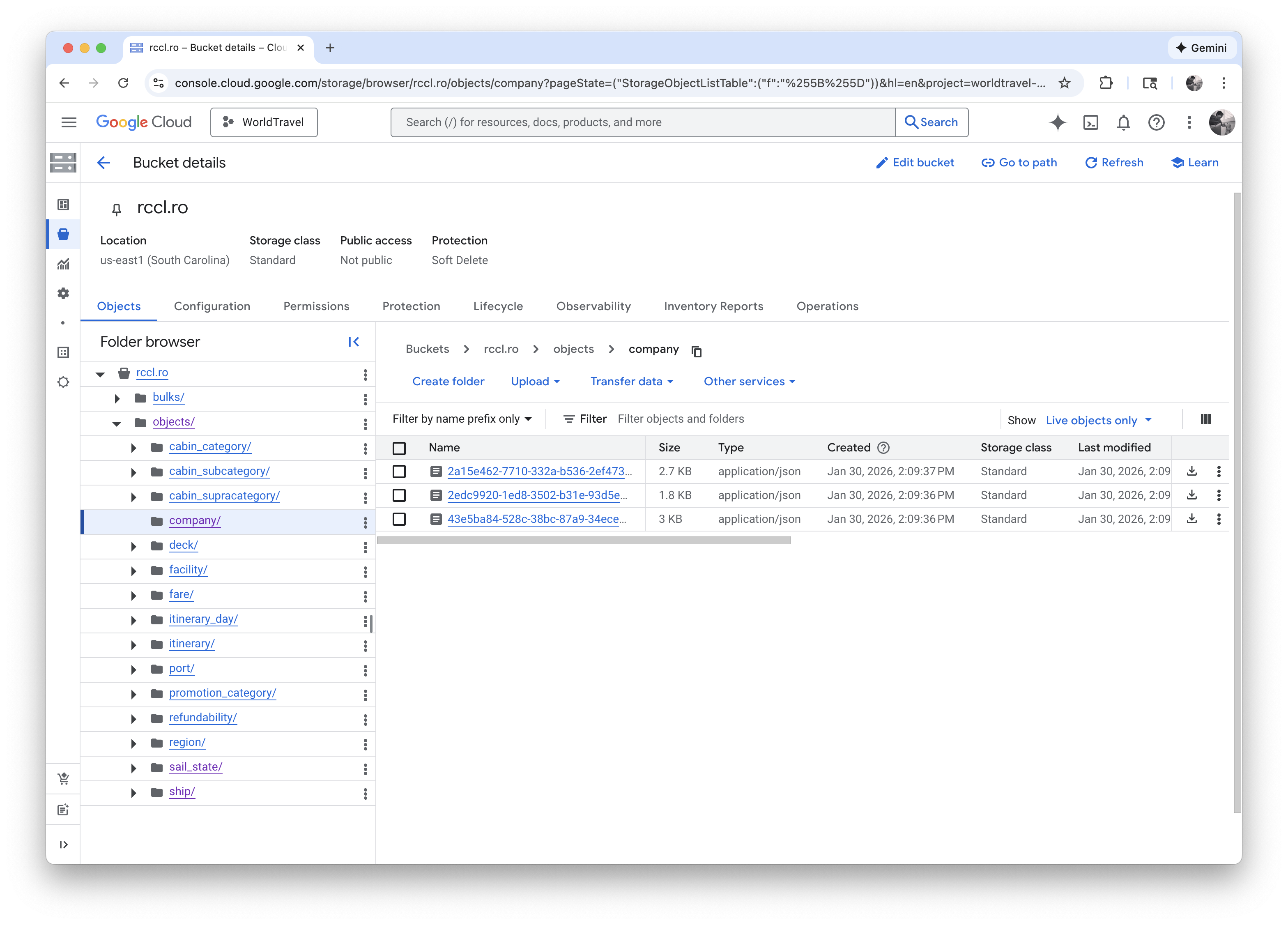
Each record is stored as a separate JSON file, named by its UUID.
| Prefix | Structure | Description |
|---|---|---|
objects/cabin_category | objects/cabin_category/<uuid>.json | One JSON file per cabin category |
objects/cabin_subcategory | objects/cabin_subcategory/<uuid>.json | One JSON file per cabin subcategory |
objects/cabin_supracategory | objects/cabin_supracategory/<uuid>.json | One JSON file per cabin supracategory |
objects/company | objects/company/<uuid>.json | One JSON file per company |
objects/deck | objects/deck/<uuid>.json | One JSON file per deck |
objects/facility | objects/facility/<uuid>.json | One JSON file per facility |
objects/fare | objects/fare/<uuid>.json | One JSON file per fare |
objects/itinerary | objects/itinerary/<uuid>.json | One JSON file per itinerary |
objects/itinerary_day | objects/itinerary_day/<uuid>.json | One JSON file per itinerary day |
objects/port | objects/port/<uuid>.json | One JSON file per port |
objects/promotion_category | objects/promotion_category/<uuid>.json | One JSON file per promotion category |
objects/refundability | objects/refundability/<uuid>.json | One JSON file per refundability policy |
objects/region | objects/region/<uuid>.json | One JSON file per region |
objects/sail_state | objects/sail_state/<uuid>.json | One JSON file per sailing state |
objects/ship | objects/ship/<uuid>.json | One JSON file per ship |
Request
GET /v1.1/files
Headers
| Header | Required | Description |
|---|---|---|
X-WorldTravel-ApiKey | Yes | API key for authentication |
Query Parameters
| Parameter | Type | Default | Description |
|---|---|---|---|
filter[prefix] | string | — | Filter files by path prefix |
page[token] | string | — | Pagination token from a previous response |
Example Requests
# List all available files
curl -X GET "https://api.rccl.ro/v1.1/files" \
  -H "X-WorldTravel-ApiKey: YOUR_API_KEY"
# List all ship bulk exports
curl -X GET "https://api.rccl.ro/v1.1/files?filter[prefix]=bulks/ship" \
  -H "X-WorldTravel-ApiKey: YOUR_API_KEY"
# List fare exports for the Africa region
curl -X GET "https://api.rccl.ro/v1.1/files?filter[prefix]=bulks/fare/AFRCA" \
  -H "X-WorldTravel-ApiKey: YOUR_API_KEY"
# List individual ship object files
curl -X GET "https://api.rccl.ro/v1.1/files?filter[prefix]=objects/ship" \
  -H "X-WorldTravel-ApiKey: YOUR_API_KEY"
Response
200 OK
Returns an array of file resources with signed download URLs.
Response body:
{
  "data": [
    {
      "type": "file",
      "id": "bulks/fare/AFRCA/JR/index.ndjson",
      "attributes": {
        "signed_url": "https://storage.googleapis.com/rccl.ro/bulks/fare/AFRCA/JR/index.ndjson?X-Goog-Signature=...",
        "updated_at": "2026-01-17T14:27:00Z"
      }
    },
    {
      "type": "file",
      "id": "bulks/fare/AFRCA/OA/index.ndjson",
      "attributes": {
        "signed_url": "https://storage.googleapis.com/rccl.ro/bulks/fare/AFRCA/OA/index.ndjson?X-Goog-Signature=...",
        "updated_at": "2026-01-17T14:27:00Z"
      }
    },
    {
      "type": "file",
      "id": "bulks/fare/CARIB/AL/index.ndjson",
      "attributes": {
        "signed_url": "https://storage.googleapis.com/rccl.ro/bulks/fare/CARIB/AL/index.ndjson?X-Goog-Signature=...",
        "updated_at": "2026-01-17T14:27:00Z"
      }
    },
    {
      "type": "file",
      "id": "bulks/fare/EURPE/VY/index.ndjson",
      "attributes": {
        "signed_url": "https://storage.googleapis.com/rccl.ro/bulks/fare/EURPE/VY/index.ndjson?X-Goog-Signature=...",
        "updated_at": "2026-01-17T14:27:00Z"
      }
    }
  ],
  "links": {
    "self": "/v1.1/files?filter[prefix]=bulks/fare",
    "next": "/v1.1/files?filter[prefix]=bulks/fare&page[token]=eyJhbGciOi..."
  },
  "meta": {
    "folders": ["bulks/fare/AFRCA/JR", "bulks/fare/AFRCA/OA", "bulks/fare/CARIB/AL", "bulks/fare/EURPE/VY"]
  },
  "jsonapi": {
    "version": "1.0"
  }
}
File Attributes
| Field | Type | Description |
|---|---|---|
signed_url | string | Pre-signed URL to download the file (valid for 24 hours) |
updated_at | string | Last modification timestamp (ISO 8601) |
Meta
| Field | Type | Description |
|---|---|---|
folders | string[] | Folder paths found within the current listing |
Pagination
This endpoint uses token-based pagination. When more results are available, the response includes a next link with a page[token] parameter. Pass this token in your next request to retrieve the following page.
Error Responses
| Status | Description |
|---|---|
401 | Unauthorized — missing or invalid API key |
500 | Internal Server Error — upstream query failure |
Common use cases
Warm up a local fare cache
To download all fare data for offline processing, start by listing the available fare folders, then download each file:
# 1. Discover all fare folders
curl -X GET "https://api.rccl.ro/v1.1/files?filter[prefix]=bulks/fare" \
  -H "X-WorldTravel-ApiKey: YOUR_API_KEY"

# 2. Download a specific fare file using the signed_url from the response
curl -o index.ndjson "SIGNED_URL_FROM_RESPONSE"
Warm up a local itinerary days cache
To download all itinerary day data for offline processing, start by listing the available folders, then download each file:
# 1. Discover all itinerary day folders
curl -X GET "https://api.rccl.ro/v1.1/files?filter[prefix]=bulks/itinerary_day" \
  -H "X-WorldTravel-ApiKey: YOUR_API_KEY"

# 2. Download a specific itinerary day file using the signed_url from the response
curl -o index.ndjson "SIGNED_URL_FROM_RESPONSE"
Download all ship data
# Get the bulk ship export
curl -X GET "https://api.rccl.ro/v1.1/files?filter[prefix]=bulks/ship" \
  -H "X-WorldTravel-ApiKey: YOUR_API_KEY"

# Download using the signed_url
curl -o index.ndjson "SIGNED_URL_FROM_RESPONSE"